
Microsoft 365 arrived to much fanfare at its launch in July 2017, with Microsoft CEO Satya Nadella promising a “fundamental departure” in how the company thinks about product creation. Nearly nine years later, Microsoft 365 has become Microsoft’s core brand for workplace productivity software, having largely replaced the Office 365 branding long associated with the productivity suite.
The breadth of Microsoft 365 apps and features continues to grow, with new additions such as Lists, Loop, and various Viva apps available alongside Copilot, Microsoft’s generative AI assistant. The range of licensing options has also broadened, and many new features require extra fees over and above standard subscription costs, bringing confusion as well as more expenses.
Now Microsoft 365 is undergoing a radical transformation: the shift from generative assistance to agentic AI. While Copilot carried out tasks in response to prompts, new agentic features rolling out allow for digital employees that can plan, execute, and govern multi-step workflows autonomously.
This move toward an AI-native infrastructure requires organizations to rethink not just their budgets, but their identity and governance frameworks. The challenge isn’t about just managing software seats. It also includes orchestrating a workforce that includes autonomous agents.
In this article:
- What is Microsoft 365?
- The road to Microsoft 365
- What versions of M365 does Microsoft sell?
- Goodbye volume pricing, hello price hikes
- Can enterprise customers buy the M365 components separately?
- What add-ons are available for M365?
- Tracking M365 sales
- What’s new in M365?
- A Microsoft 365 glossary
What is Microsoft 365?
At its most basic, Microsoft 365 (M365) is a collection of Microsoft applications and services sold as a subscription. Loosely, the term refers to a licensed suite of Microsoft productivity apps for document creation, collaboration, communication, and more, sometimes bundled with Windows and a variety of security and management tools.
All M365 subscriptions include some version of the core Office apps: Word (document editing), Excel (spreadsheets), PowerPoint (presentations), and Outlook (email). But beyond that, the specific set of software and services included with each M365 plan varies significantly.
Because it’s sold on a subscription basis, Microsoft 365 customers incur monthly or annual fees for each user. As long as the subscription is maintained, all software updates and upgrades, including new features, are included at no extra charge. Because that software is continuously refreshed, it is always supported by Microsoft. But if a customer stops paying for the subscription, the software eventually stops working.
Most apps in the Microsoft 365 suite are available as desktop applications you can install on Windows or macOS, mobile apps for Android or iOS, and web apps you use in a browser. Some of the more recent apps are web only, and some M365 subscriptions don’t include the desktop versions of the apps — all of which adds to the confusion over what Microsoft 365 means.
The road to Microsoft 365
To understand how we got here, let’s take a step back and see how Microsoft 365 came to be.
It all began with Microsoft’s decades-old Office suite. When it was introduced in 1988, Office packaged the company’s three main productivity apps: Word, Excel, and PowerPoint. Over the years, Outlook, OneNote, and numerous other apps were added to the suite. Throughout the ’90s and ’00s, the Office suite was sold as perpetually licensed desktop software: You paid for the software once and didn’t pay again until you upgraded to a newer version of the suite, which was typically released every three years or so. You also didn’t get any new features until you upgraded to a new version of the suite, and eventually Microsoft would stop supporting the older software with security patches.
In 2010, the company introduced Office 365, a subscription version of Office for enterprises that incorporated Microsoft services such as Exchange and SharePoint. In subsequent years, Office 365 plans became available for smaller businesses and consumers, and the suite continued to expand, with notable additions including OneDrive, Teams, and Power BI. You can still buy the perpetually licensed version of Office — the current version is Office 2024 — but the subscription model gradually overtook it in popularity.
Microsoft 365 subscriptions were introduced in 2017 as a higher-level offering for business and enterprise customers that bundled Office 365 with Windows 10 and Enterprise Mobility + Security, a suite of security and management tools. At that time, Office 365 subscriptions without those additions were still available for business and enterprise customers, and all consumer subscriptions still used the Office 365 moniker.
Then Microsoft muddied the waters in 2020 by slapping the Microsoft 365 branding on most of its Office 365 plans. At the enterprise level, the original Microsoft 365/Office 365 branding distinction remains: M365 plans include Windows, O365 plans don’t. But all small business and consumer plans are now called Microsoft 365, even though they don’t include Windows.
So when you hear the term “Microsoft 365,” you know it means a set of Microsoft’s popular productivity apps and services, but it could be anything from a small group of web-based apps for consumers to a soup-to-nuts enterprise package that includes licenses for Windows and a laundry list of Office apps on desktop, mobile, and web, plus an array of advanced storage, security, and management tools. (See the glossary at the end of this story for quick definitions of the product names for apps and services included with M365 plans.)
For help using Microsoft 365 apps, see our collection of M365 tutorials.
What versions of M365 does Microsoft sell?
Microsoft offers a wide range of versions and pricing plans. The primary options are shown here.
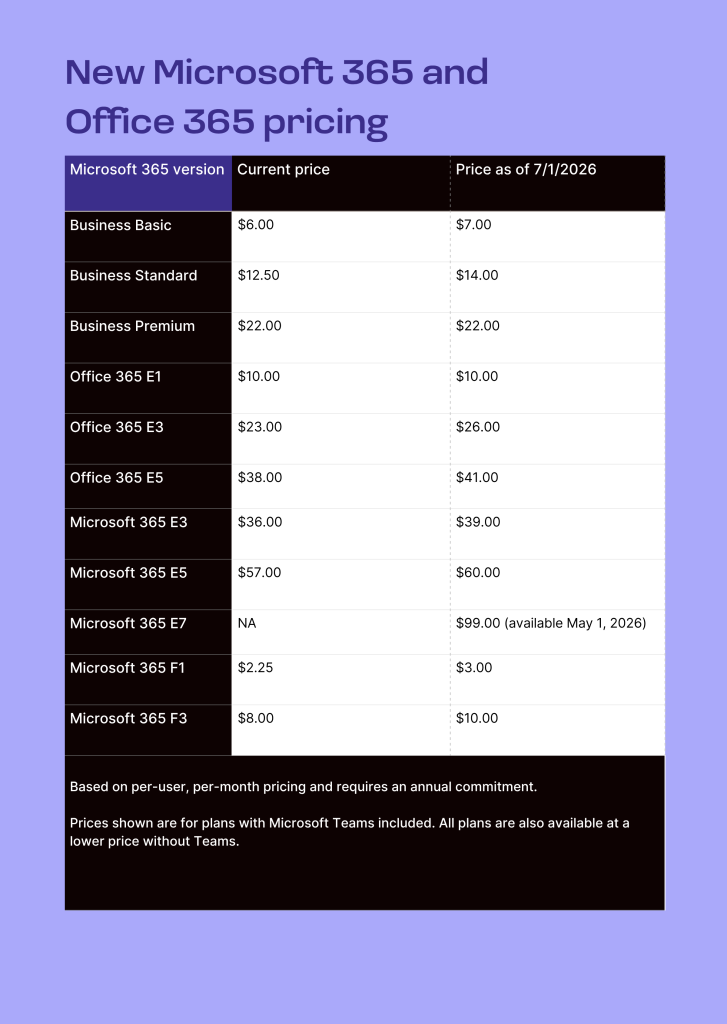
(Prices are in US dollars and may vary in other countries. These plans include Teams, Microsoft’s chat and videoconferencing app, but are also available in lower-cost versions without Teams. The prices for most of these plans are set to rise on July 1, 2026 — see chart below.)
Microsoft 365 Enterprise: Available in E3 and E5 configurations for firms subscribing more than 300 employees in a plan. The E3 plan (currently $36/user/month) includes user licenses for Windows 11 Enterprise and a long list of Office apps on desktop, mobile, and web; services such as Exchange, SharePoint, and OneDrive; 1TB of OneDrive cloud storage; and core security and identity management tools. The E5 plan ($57/user/month) adds advanced security, compliance, and analytics tools.
Starting May 1, 2026, a new Microsoft 365 E7 tier will be available. At $99/user/month, it bundles all the features of Microsoft 365 E5 — including Entra Suite, Defender, Intune and Purview — with Microsoft 365 Copilot and Agent 365.
Office 365 Enterprise: These technically aren’t Microsoft 365 plans, but organizations with more than 300 users should be aware that they are still available (for now, at least). Available in E1, E3, and E5 configurations with costs ranging from $10/user/month to $38/user/month, these plans are similar to the M365 Enterprise subscriptions but do not include Windows licenses.
Microsoft 365 Business Basic, Standard, and Premium: Suitable for small and midsize companies, the plans have a hard limit of 300 seats and cost from $6/user/month to $22/user/month. The Basic level includes only the web and mobile versions of Office apps, along with 1TB of OneDrive storage and key business services including SharePoint and Exchange. The Standard plan adds the desktop apps and a few additional apps such as Clipchamp and Loop. The Premium package includes advanced security and access management features.
Microsoft 365 Apps for Business and Microsoft 365 Apps for Enterprise: The just-the-apps version of Microsoft 365 for small businesses ($8.25/user/month) includes the Word, Excel, PowerPoint, and Outlook desktop apps and 1TB of OneDrive storage. The enterprise version ($12/user/month) includes several more Office apps and enterprise-grade security, management, and compliance tools.
Microsoft 365 F1 and F3: Targeted at frontline workers — those on factory floors, in retail, or in the field — these plans are designed for users who primarily use mobile or web-based apps rather than full desktop installs. Available for as little as $2.25/user/month (F1) and $8/user/month (F3), these plans will see the steepest price hikes in the portfolio in July.
Microsoft 365 Education, Microsoft 365 Government, Microsoft 365 Nonprofit: These plans offer varying blends of Windows 11, Office apps, and associated tools at prices suitable for each market (including a donated license for nonprofits). Government plans, for example, offer several compliance levels to meet regulatory requirements.
Microsoft 365 Free, Basic, Personal, Family, and Premium: These consumer plans range from free (really) to $200 per year. The free tier demonstrates just how much the company has diluted its Microsoft 365 brand: it’s limited to a handful of web and mobile apps, includes just 5GB of cloud storage, and uses an ad-supported version of Outlook. The Basic plan adds more storage and an ad-free version of Outlook, while the Personal plan offers the desktop Office apps, 1TB of cloud storage, and includes some Copilot AI features. The Family plan is meant for up to six users and offers 6TB of cloud storage and basic Copilot features for one user. The Premium plan adds more advanced AI features and higher usage limits.
Goodbye volume pricing, hello price hikes
Microsoft eliminated volume-based discounts for its online services (including Microsoft 365) in November 2025. This change is a shift in how large enterprises purchase software, potentially increasing costs by up to 13% for organizations traditionally covered by enterprise agreements (EA).
For decades, the more “seats” your company bought, the cheaper each seat became. Microsoft ended this tier system in a move to achieve pricing consistency across all sales channels, aligning M365 with the model already used for Azure.
Midsize businesses and large corporations that rely on scale to drive down costs experienced the biggest risk. For organizations managing hundreds or thousands of seats, this change could add millions of dollars in annual expenses.
While direct EA discounts are disappearing, the Cloud Solution Provider (CSP) program remains an alternative. Partners in the CSP program can still negotiate custom pricing and offer three-year price locks, which were introduced to help insulate customers from these hikes.
Analysts recommend that IT leaders move toward outcome-based pricing and continuous license optimization. Rather than just buying in bulk, companies should focus on rightsizing their commitments and accelerating the adoption of high-value tools like Copilot to justify the increased per-seat cost.
There’s more bad news for enterprise buyers: Microsoft is set to implement significant price increases for commercial Microsoft 365 subscriptions starting on July 1, 2026. These hikes, ranging from 9% to 25% depending on the plan, affect most plans in the business and enterprise tiers. Microsoft justifies the increase by citing the addition of new features, including expanded Copilot Chat functionality, enhanced security via Defender, and new Intune analytics.
Foundry
Analysts from Gartner warn that these changes — coupled with the phasing out of volume-based discounts — will intensify “pricing fatigue” among enterprise customers. To mitigate the financial impact, experts recommend several “WorkOps” strategies:
- Early renewals: Lock in current rates before the July deadline to defer the increase.
- License optimization: Audit usage to eliminate “shelfware” and ensure users aren’t over-licensed.
- Negotiation: Leverage multi-year agreements to secure better terms.
(See sidebar later in this article for more details on how to structure a M365 budget strategy.)
Can enterprise customers buy the M365 components separately?
Microsoft continues to sell Windows 11 Enterprise, Windows 11 Pro, Enterprise Mobility + Security (EMS), and legacy staples like Exchange and SharePoint Online à la carte. For those not needing the full suites, the Office 365 and Microsoft Apps for Enterprise plans remain viable subsets of the broader M365 ecosystem.
Buying every component of a Microsoft 365 subscription separately remains a losing game financially — much like buying a magazine (remember those?) issue-by-issue rather than subscribing. However, the à la carte path remains attractive for multicloud organizations that prefer to mix-and-match best-of-breed tools.
For instance, EMS E5 — the premium tier for identity and security — retails for over $16 per user per month. Organizations can still extract pieces of that bundle, purchasing Entra ID (formerly Azure AD) or Microsoft Intune (a cloud-based unified endpoint management service designed to secure and manage apps and Windows, iOS, Android, macOS, Linux devices). While this provides flexibility for those avoiding total vendor lock-in, the bundle discount offers most enterprises the best ROI.
What add-ons are available for M365?
There’s a large and growing list of optional paid M365 apps and features, many of which are not included in even the most expensive E5 subscription tier. These add-ons can quickly bump up monthly costs.
Microsoft 365 Copilot is one such example. A $30/user/month add-on subscription, M365 Copilot has access to your organization’s data via the Microsoft Graph, meaning it can find information in files across your tenant, including in files you don’t currently have open. For instance, it can draft emails based on last week’s meetings, summarize Teams chats, or pull together information from various documents, presentations, and spreadsheets. M365 Copilot also provides priority access to the latest models (like GPT-5) and advanced AI agents for automated workflows.
Until recently, businesses with 300 or fewer employees had to pay the same fee as large enterprises for Microsoft 365 Copilot, but in November 2025, Microsoft introduced a new Microsoft 365 Copilot Business subscription that offers small businesses the same features for $21/user/month.
Confusingly, there’s a freemium version of M365 Copilot called Copilot Chat that is included in most commercial M365 plans at no extra cost. It’s a web-based AI assistant with enterprise-grade data protection but limited capabilities compared to M365 Copilot. It can search the web and help you work with a file you currently have open — such as summarizing an email or analyzing a spreadsheet — but it cannot “see” your other documents, emails, calendar, or internal SharePoint files.
In addition to the standalone Copilot Chat app, users with a commercial Microsoft 365 plan can currently access Copilot from inside apps such as Word, Excel, PowerPoint, and Outlook. As of April 15, 2026, however, Microsoft will remove access to Copilot from within the M365 apps in organizations with more than 2,000 users, unless those organizations pay for the M365 Copilot add-on license. Enterprises with fewer than 2,000 users will still be able to access Copilot from the M365 apps but will be subject usage limits. Copilot access will continue in Outlook but no other M365 apps.
To help users distinguish between the two versions, Microsoft is introducing two in-product labels: “Copilot Chat (Basic)” if they don’t have a Microsoft 365 Copilot license and “M365 Copilot (Premium)” if they do.
There are other Copilot add-ons as well, including Security Copilot and Copilot Studio, a low-code tool for building AI agents. Both offer usage-based pricing.
Microsoft Power Apps offers three primary pricing tiers tailored to different organizational needs. The Developer Plan is free for building and testing apps in a dedicated environment. For production use, Microsoft offers the Premium Plan. The first version costs $20/user/month (billed annually), allowing users to run unlimited applications. Organizations with large-scale deployments can access a discounted rate of $12/user/month with a 2,000-seat minimum.
All paid plans include access to the Dataverse, prebuilt connectors, and managed environments. Additional add-ons are available for Dataverse storage capacity ($40/GB) and Power Pages authenticated users.
There’s also a Teams add-on package, Teams Premium, which provides access to several features not included in the core app for an additional $10/user/month (currently on offer for $7/user/month). This includes live caption translations, custom branding in Teams meeting “lobbies,” AI-generated tasks and notes, end-to-end encryption for group calls, and more.
Microsoft has also introduced premium add-on packages branded as “suites.” Take Microsoft Viva, for instance, the set of employee experience applications that includes Viva Learning, Viva Engage, Viva Connections, Viva Glint, and more. While certain features of each Viva are available within most enterprise M365 subscriptions, others can be purchased individually (Viva Glint, for example) or via one of three Viva add-on bundle tiers. Viva Suite is the most comprehensive of these, with access to all the Viva features for an extra $12/user/month.
Entra Suite, a collection of identity and access tools, and Intune Suite for endpoint management and security are other examples of bundled add-ons available for additional monthly fees.
Tracking M365 sales
Microsoft still blends Microsoft 365 and Office 365 sales in its financial reports, so it’s difficult to track exact splits. However, the trajectory is clear: Microsoft is moving from productivity to AI-led operations.
Office 365 commercial seats have passed 450 million globally. While seat growth has slowed to single digits (5-6% year-over-year based on 2025 earnings), revenue growth remains in the double digits — thanks largely to Microsoft aggressively pushing toward E5 upgrades and upselling Microsoft 365 Copilot.
As a comparison, Google Workspace — M365’s primary rival — reported surpassing 12 million paying organizations in late 2025. While Google remains a viable alternative, Microsoft’s entrenched position in the enterprise benefits from the October 2025 end-of-support for Windows 10. This has forced a massive hardware refresh cycle, pushing Windows 11 adoption past the 55% mark and pushing more organizations to M365 E3/E5.
What’s new in M365?
The integration of Copilot across M365 apps has undoubtedly been the major focus for Microsoft in the past couple of years. It’s rare to see a product news update on the Microsoft 365 blog that doesn’t reference the AI assistant in some way.
Recent feature additions include a new Team Copilot that provides AI assistance in group meetings and makes suggestions for task management; Copilot Studio for customizing Copilots in M365; access to OpenAI’s GPT-4 Turbo model; and the general availability of Microsoft’s Designer AI image generator. Other new apps and features include Mesh immersive meetings for Teams, Places for hybrid work coordination, and a UI refresh for the Loop collaboration app.
According to Microsoft, the new Microsoft 365 E7 suite (announced in March) marks a shift toward the agent-operated enterprise. Launching May 1, 2026 for $99/user/month ($90.45 without Teams), E7 is designed to unify the M365 E5 offering with Microsoft 365 Copilot and the upcoming Agent 365. Also available as a standalone service priced at $15/user/month, Agent 365 essentially acts as the “control plane” for IT to see what your AI agents are actually doing.
A Microsoft 365 glossary
Browsing through M365 plans and add-ons turns up a bewildering list of included apps and services. Here’s a brief guide to what the main product names mean.
Core M365 apps and services
- Word: word processing app (see tutorial)
- Excel: spreadsheet app (see tutorial)
- PowerPoint: presentation app (see tutorial)
- Outlook: email, calendar, and contacts app (see tutorial)
- OneNote: notes app (see tutorial)
- Teams: optional group chat and video meeting app (see tutorial)
- OneDrive: cloud storage with versions available for both individuals and corporate users (see tutorial)
- SharePoint: business/enterprise platform for shared content, sites, and apps
- Exchange: hosting/management service for business/enterprise email, calendar, and contacts
- Windows: desktop operating system (included only with M365 E3 and E5 plans)
- Copilot: catch-all term for Microsoft’s generative AI assistant in various forms, from a basic, free tool to an advanced agentic orchestration tool that requires an add-on license
Additional M365 apps and services (not included with all plans)
- Access: database creation app (Windows only)
- Bookings: appointment scheduling and management app
- Clipchamp: video editing app
- Forms: survey and form creation app (see tutorial)
- Lists: spreadsheet/work tracking app
- Loop: shared workspace app (see tutorial)
- Publisher: desktop publishing app (Windows only, will be discontinued Oct. 2026)
- Planner: work management app (see tutorial)
- Power Apps: low-code development platform
- Power Automate: workflow automation app (see tutorial)
- Power BI Pro: analytics and data visualization app
- Stream: enterprise video streaming and sharing platform
- Sway: publishing app for presentations, reports, newsletters
- Teams Phone: enterprise telephony service for Microsoft Teams (requires additional monthly fee per user)
- To Do: task management app
- Visio: diagram and vector graphics app (see tutorial)
- Viva Amplify: employee communication management app
- Viva Connections: intranet app
- Viva Engage (formerly Yammer): enterprise social network app
- Viva Glint: organization-wide employee feedback/survey app
- Viva Goals: objective setting and tracking app
- Viva Insights: productivity and wellbeing analytics app
- Viva Learning: learning and development app
- Viva Pulse: self-service employee feedback app for team leads
Security and management tools (not included with all plans)
- Defender: set of enterprise security apps and services, or a security app for consumers
- Entra: set of enterprise identity and access management tools, includes Entra ID (formerly Azure Active Directory)
- Intune: set of enterprise endpoint management tools
- Priva: set of enterprise data privacy management tools
- Purview: set of enterprise data governance, security, risk, and compliance tools
Valerie Potter contributed to this article.
This article was originally published in May 2018 and most recently updated in April 2026.