
Man, when it comes to Android, Slack sure has been slackin’.
The app is generally considered the go-to, standard tool for most professional communication — right? And yet, somehow, it has managed to exist on the most used mobile operating system all this time without offering up a single Android widget to make our on-the-go musings a wee bit easier.
Well, join me for a collective hallelujah: The folks behind Slack have seemingly found the time for a break from launching overhyped AI features no one actually wants (better known as “those annoying upsell prompts you have to dismiss in the app every four to seven weeks”) and seen fit to (gasp!) create an actual home screen widget for those of us on Android to enjoy.
Hey, it’s only 13 years delayed! (Slack first launched on Android in 2013.) But better late than never — and if you’re using Slack on Android already, it’s well worth your while to dig up, try out, and put into action.
[Get fresh practical insight in your inbox with my free Android Intelligence newsletter. Three new things to try every Friday!]
Your new Slack Android widget surprise
Now, first things first, before you get too excited: Our freshly surfaced Slack Android widget miracle may not be everything you’d hope it to be.
Back in the summer of ’24, y’see, Slack unveiled a series of four widget options for our friends over in the magical and revolutionary land of Apple-stamped iGizmos — sensibly offering a variety of practical functions for direct ‘n’ easy ongoing access to our counterparts on that side of the digital divide.
We lowly Android-appreciating organisms clearly aren’t magical nor revolutionary enough to earn that kind of equality, even two years after the fact, but — well, luckily, the one widget we are getting right now might be the most useful one of all.
It creates a simple status-setting shortcut on your home screen that lets you pick from one of several premade status options and set ’em for yourself with a single swift tap of your favorite phelange. See?

JR Raphael, Foundry
Now, if we want to further shame Slack and focus on how little the team behind it seems to actually use or understand Android, we could point out that this widget awkwardly doesn’t allow you to resize it vertically — making it taller, in other words — and so its available options weirdly require a slight internal scroll to fully see, without the bottom two being cut off even in the widget’s wide-as-possible form. That’s pretty sloppy and not exactly what you’d expect from a professional developer of any caliber.
We could also note how it’s odd that the widget’s status-setting options don’t sync up and align with any custom or recent Slack statuses you’ve created and used within your own actual Slack team space and instead stick to only the most generic all-purpose defaults imaginable. That feels like a pretty weird choice when it comes to user experience in this day and age.
And, if we really wanna pick at nits, we might note how vexing it is that a feature of this magnitude didn’t ever even show up in the Slack Android app’s “What’s new” list in the Play Store — or even within the more elaborate Slack for Android release notes on the company’s website. You really had to just luck out and happen to be poking around in the right place, as I did this week, to stumble onto the addition and realize it was there.
But hey, we won’t go down that road. The truth is that even just having a one-tap shortcut to set a Slack status from the home screen is a pretty incredible improvement — and, similarly, being able to see your current Slack status at a glance and reset it with just one tap from your home screen is a powerful enhancement of its own.
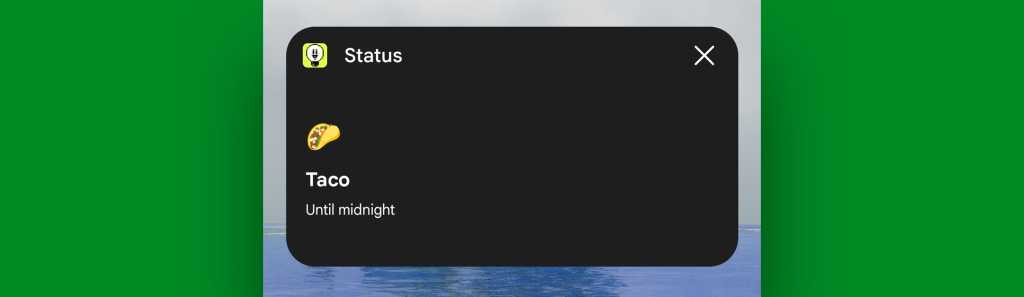
JR Raphael, Foundry
So head on over to the Play Store, make sure your Slack app is updated to the latest available version, and then press and hold any open spot on your home screen to seek out our sole new widget addition.
All well-warranted snark aside, it truly is a useful new element to have in front of us after all this time — and hey, who knows? Maybe in another 13 years, we’ll get a second widget added into the mix.
Maybe.
Feed yourself fresh Android wisdom every Friday with my free Android Intelligence newsletter. Three new things to try in your inbox — and plenty of interesting extras along the way.